
ZMetrics guide
How to track crypto prices in Chrome
Checking crypto prices should not require a collection of open tabs. This guide explains the practical ways to follow market data in Chrome and where a focused browser extension fits.
Why track crypto prices in Chrome?
Crypto markets move throughout the day, but checking them can interrupt the work you are already doing. Opening several websites, finding the right market pair and switching back to your task adds friction to a simple question: what is the price right now?
A browser-based workflow keeps that check close to the context where you need it. You can see a short list of relevant assets, review their daily movement and return to your tab without turning a quick update into a full research session.
What is the easiest way to track crypto prices in Chrome?
There are three common approaches. Dedicated crypto websites provide extensive market information, but they usually require another tab. Dashboards can combine charts, portfolios and news, but they are more than you need for a fast price check.
A Chrome extension is useful when the goal is speed. It can place a compact tracker in the browser toolbar, keep a small watchlist ready and open without taking you away from the page you are reading. The right choice depends on whether you need full portfolio management or simply want current market data close at hand.

Install the ZMetrics Chrome extension
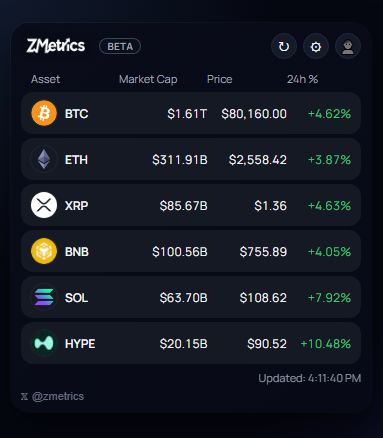
ZMetrics is built for quick market checks inside Chrome. To get started, open its official Chrome Web Store listing, install the extension and open it from the browser toolbar. The first view gives you a compact list of tracked assets and their current market data.
- 1Install ZMetrics from the Chrome Web Store.
- 2Open the extension from the Chrome toolbar.
- 3Choose the assets you want to follow.
Open the tracker and choose your assets
A useful crypto price tracker should show the assets you actually follow, rather than forcing you through a long market list every time. ZMetrics lets you search for assets and add them to a personal watchlist.
After adding an asset, you can arrange the list around your priorities. You can also choose whether prices appear in USD or EUR, so the display matches the way you review the market.
- SOLSolana
- SOLVSolv Protocol


Add assets
Tracked assets
- BTCBitcoin
- ETHEthereum
- XRPXRP
- SOLSolana


Set the order
Currency
Choose a currency
Track prices with a popup, shortcut and floating window
When you need a quick update, open the popup from the toolbar. For a faster workflow, use the keyboard shortcut to open the tracker without reaching for the mouse.
The floating window gives you another option when you want market data to remain visible beside the page you are working on.
ZMetricsCustomize your crypto watchlist
Personalization is useful when your market routine changes. Add the assets that matter to you, remove anything you no longer need and reorder the list so the most relevant prices appear first.
Is ZMetrics a portfolio tracker?
No. ZMetrics is designed for price tracking and quick market checks. It does not manage wallets, record holdings or track trades. If you need balances, transaction history or portfolio performance, you need a dedicated portfolio tool.
Privacy and permissions
ZMetrics uses focused permissions for its extension features, including storing your preferences and supporting the floating window. Market data is requested from CoinGecko. The extension does not access the content of the pages you browse.
Read the Privacy PolicyFrequently asked questions
Can I track crypto prices directly in Chrome?
Yes. A Chrome extension can show market prices in a popup or floating window, so you can check the market without opening a separate dashboard.
Is there a Chrome extension for crypto prices?
Yes. ZMetrics is a Chrome crypto price tracker for quick checks of live prices, market caps and 24h changes.
Can I customize my crypto watchlist?
Yes. You can search for assets, add them to your list, change their order and choose between USD and EUR display.
Does ZMetrics track my wallet?
No. ZMetrics is designed for price tracking. It does not manage wallets, holdings or trades. See the Privacy Policy for the current data and permissions details.
Start tracking crypto in Chrome
Keep the market close without adding another dashboard to your workflow.